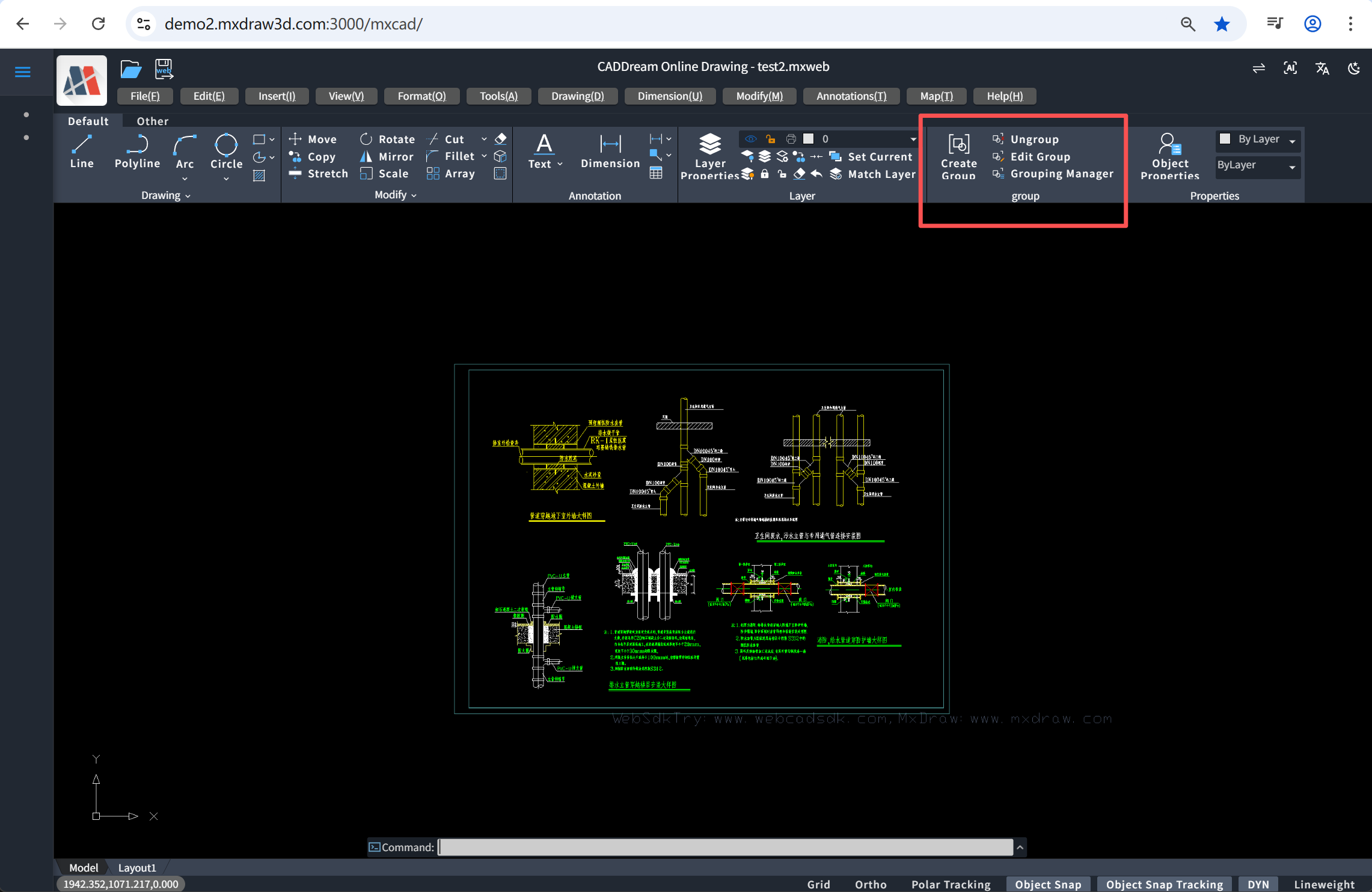
Development of "Group" Function in mxcad
When using CAD tools for drawing, in the face of complex graphic structures, how to efficiently manage multiple objects has become the key to improving work efficiency. The "Group" function provided by CAD is a practical tool designed to solve this problem. This article will comprehensively introduce the concept of "Group" in mxcad and how to implement the development of group-related functions.
1. What is a "Group"?
In CAD, a Group refers to logically combining multiple graphic objects to form a collection that can be operated uniformly. A group does not create new primitive entities, nor does it change the geometric properties of the objects themselves; it is only a named collection of objects.
The characteristics of group objects are as follows:
- Objects in the group remain independent and can be edited individually.
- When any object in the group is selected, the entire group can be selected (depending on system settings).
- Each group has a unique name for easy identification and management.
- Supports nesting: one group can contain another group, forming a hierarchical structure.
- Groups are not stored as independent entities in the graphic database, but only exist as logical associations of objects.
2. Core Function Development of Groups
1. Create a Group
The function process starts when the user executes the "Create Group" command. First, the system initializes relevant variables (such as group name, description, and object list) and obtains the group management dictionary in the current graphic database.
Then enter the main loop and prompt the user to "Select objects". The user can select one or more graphic objects by clicking or window selection, and the IDs of the selected objects will be saved to a temporary list.
During the selection process, the user can enter keywords at any time for settings:
- Enter N (Name): Enter the naming process, and the system prompts "Enter group name". At this time, you can enter
[Query(A)]to view existing group names; if you enter*or press Enter directly, all groups will be listed; otherwise, query the specified group information. After entering the name, the system checks for duplicate names, and if there is no conflict, saves the name and returns to the selection state. - Enter D (Description): Enter the description setting, prompt "Enter group description", and the text entered by the user will be used as the description information of the group.
When the user completes the selection and confirms by pressing Enter or Spacebar, the system starts to create the group:
- First, check if any members in the selected objects already belong to other groups.
- If such a situation exists, a confirmation prompt will pop up, and provide "Yes(Y)/No(N)" options.
- If the user selects "No" or cancels the operation, the command is terminated.
- If the user confirms to continue or there is no conflict, call the underlying API to create the group, and assign the previously entered description information to the new group.
Finally, the group is created, the system exits the loop, and the command execution ends. The entire process supports ESC interruption or new command interruption to ensure the safety and flexibility of the operation.
The implementation method by calling the internal API interface of mxcad according to the above process is as follows:
import { McDbEntity, McDbGroup, McDbPolyline, McGePoint3d, McObjectId, MxCADSelectionSet, MxCADUiPrKeyWord, MxCADUiPrPoint, MxCADUiPrString, MxCADUtility, MxCpp } from "mxcad";
import { DetailedResult, MxFun, MrxDbgUiPrBaseReturn } from "mxdraw";

interface GroupObject {
    name: string,
    group: McDbGroup
}
// Find group by entity
const getGroupForEntity = (entity: McDbEntity): GroupObject[] => {
    const database = MxCpp.getCurrentDatabase()
    const groupDict = database.GetGroupDictionary()
    const handle = entity.getHandle()
    const groupNames = groupDict.getAllObjectName()
    const length = groupNames.length();
    let groupArr: GroupObject[] = [];
    for (let index = 0; index < length; index++) {
        const groupName = groupNames.at(index);
        const groupId = groupDict.getAt(groupName)
        const group = groupId.getMcDbObject() as McDbGroup
        if (!group) continue;
        const entityIds = group.getAllEntityId();
        entityIds.forEach(entityId => {
            if (entityId.getMcDbEntity()?.getHandle() === handle) groupArr.push({ name: groupName, group })
        });
    };
    return groupArr
}

// Create group
async function Mx_Group() {
  let description = ""
  let ids: McObjectId[] = [];
  const database = MxCpp.getCurrentDatabase();
  const groupDict = database.GetGroupDictionary();
  const mxcad = MxCpp.getCurrentMxCAD();

  // Set unnamed group name
  const groupNames = groupDict.getAllObjectName();
  let num = 0;
  groupNames.forEach(item => {
    if (/^\*/.test(item)) {
      num += 1;
    }
  });

  let name: string = `*A${num + 1}`;

  // Create group
  const createGroup = async () => {
    const isPresence = ids.some((id) => {
      return database.getEntitiesInTheGroup(id).length !== 0
    })
    if (isPresence) {
      const getKey = new MxCADUiPrKeyWord();
      getKey.setMessage(`A group containing the same objects already exists. Still create a new group? <N>`);
      getKey.setKeyWords(`[Yes(Y)/No(N)]`);
      const key = await getKey.go();
      ids.forEach(id => {
        id.getMcDbEntity().highlight(false);
      })
      mxcad.updateDisplay();
      if (key?.toLocaleUpperCase() === "N") {
        return
      }
      if (!key) return
    }
    if (database.CreateGroup(ids, name)) {
      const groupId = groupDict.getAt(name)
      const group = groupId.getMcDbObject() as McDbGroup;
      if (description) group.description = description;
      if (/^\*/.test(name)) {
        MxPluginContext.useMessage().success('Unnamed group created');
      } else {
        MxPluginContext.useMessage().success(`Group ${name} created`);
      }
      ids.forEach(id => {
        id.getMcDbEntity().highlight(false);
      })
      mxcad.updateDisplay();
    };
  };

  while (true) {
    const getEntityPt = new MxCADUiPrPoint();
    getEntityPt.setMessage('Select objects');
    getEntityPt.setKeyWords(`[Name(N)/Description(D)]`);
    getEntityPt.setDisableOsnap(true);
    getEntityPt.setDisableDynInput(true);
    getEntityPt.disableAllTrace(true);

    const hoverSelectEnts: McDbEntity[] = [];
    getEntityPt.setUserDraw((pt, pw) => {
      if (hoverSelectEnts.length) hoverSelectEnts.forEach(ent => ent.highlight(false));
      hoverSelectEnts.length = 0;
      const entId = MxCADUtility.findEntAtPoint(pt.x, pt.y, pt.z, -1);
      if (entId.isValid() && !ids.map(item => item.id).includes(entId.id)) {
        const ent = entId.getMcDbEntity();
        const arr = getGroupForEntity(ent);
        if (arr.length) {
          const group = arr[0].group;
          group.getAllEntityId().forEach(id => {
            const ent = id.getMcDbEntity();
            ent.highlight(true);
            hoverSelectEnts.push(ent)
          })
        } else {
          ent.highlight(true);
          hoverSelectEnts.push(ent)
        }
      }
    });
    const pt = await getEntityPt.go();
    hoverSelectEnts.forEach(ent => ent.highlight(false));
    // If a keyword is selected, perform the relevant operation
    if (getEntityPt.getStatus() == MrxDbgUiPrBaseReturn.kKeyWord) {
      if (getEntityPt.isKeyWordPicked("N")) {
        while (true) {
          const getName = new MxCADUiPrString()
          getName.setMessage("Enter group name")
          getName.setKeyWords(`[Query(A)]`)
          const str = await getName.go()
          if (getName.getDetailedResult() === DetailedResult.kCodeAbort || getName.getDetailedResult() === DetailedResult.kEcsIn || getName.getDetailedResult() === DetailedResult.kNewCommadIn) return
          if (getEntityPt.getDetailedResult() === DetailedResult.kNullEnterIn || getEntityPt.getDetailedResult() === DetailedResult.kNullSpaceIn || getEntityPt.getDetailedResult() === DetailedResult.kMouseRightIn) {
            return createGroup()
          }
          if (getName.isKeyWordPicked("A")) {
            getName.setMessage("Enter the coded group name to list" + "<*>")
            getName.setKeyWords("")
            const name = await getName.go();
            if (getName.getDetailedResult() === DetailedResult.kCodeAbort || getName.getDetailedResult() === DetailedResult.kEcsIn || getName.getDetailedResult() === DetailedResult.kNewCommadIn) return
            if (name && name !== "*") {
              const groupId = groupDict.getAt(name)
              const group = groupId.getMcDbObject() as McDbGroup
              MxFun.acutPrintf(`\n Defined groups:`)
              if (group) {
                MxFun.acutPrintf(`\n${group.name}`)
              }
            }
            else if (name === "*" || getName.getDetailedResult() === DetailedResult.kNullEnterIn || getName.getDetailedResult() === DetailedResult.kNullSpaceIn) {
              const groupIds = groupDict.getAllObject()
              MxFun.acutPrintf(`\n Defined groups:`)
              groupIds.forEach((groupId) => {
                const group = groupId.getMcDbObject() as McDbGroup
                group && MxFun.acutPrintf(`\n ${group.name}`)
              })
            }
            continue;
          }
          if (!str) return;
          if (/^\*/.test(str)) {
            MxFun.acutPrintf(`*Invalid`);
            continue;
          }
          const groupId = groupDict.getAt(str)
          const group = groupId.getMcDbObject() as McDbGroup
          if (group && groupId.isValid()) {
            MxFun.acutPrintf(`Group ${str} already exists`);
            continue;
          }
          name = str;
          if (ids.length) {
            ids.forEach(id => {
              const ent = id.getMcDbEntity();
              ent.highlight(false);
            })
            return createGroup();
          } else {
            break;
          }
        }
      } else if (getEntityPt.isKeyWordPicked('D')) {
        const getName = new MxCADUiPrString()
        getName.setMessage("Enter group description")
        const str = await getName.go();
        if (!str) break;
        description = str
        continue;
      }
    } else if (getEntityPt.getStatus() === MrxDbgUiPrBaseReturn.kNone) {
      if (!ids.length) {
        return MxPluginContext.useMessage().success('No objects selected, no group created');
      } else {
        ids.forEach(id => {
          const ent = id.getMcDbEntity();
          ent.highlight(false);
        })
        return createGroup();
      }
    } else if (getEntityPt.getStatus() === MrxDbgUiPrBaseReturn.kCancel) {
      ids.forEach(id => {
        const ent = id.getMcDbEntity();
        ent.highlight(false);
      })
      return
    } else {
      // Determine if an entity is selected
      if (pt && hoverSelectEnts.length) {
        const selectIds = hoverSelectEnts.map(item => {
          item.highlight(true);
          return item.getObjectID()
        })
        ids.push(...selectIds);
        continue;
      } else if (pt && !hoverSelectEnts.length) {
        getEntityPt.setUserDraw((point, pw) => {
          const pts = [pt, new McGePoint3d(pt.x, point.y), point, new McGePoint3d(point.x, pt.y)]
          // Set the color and position of the bounding box
          let pl = new McDbPolyline();
          pl.isClosed = true;
          pts.forEach(pt => pl.addVertexAt(pt));
          pw.setColor(0xFFFFFF);
          pw.drawMcDbEntity(pl);

          // Dynamically draw a rectangular fill box
          const geometry = new THREE.BufferGeometry();
          geometry.setFromPoints([
            new THREE.Vector3(pt.x, pt.y, pt.z),
            new THREE.Vector3(pt.x, point.y, pt.z),
            new THREE.Vector3(point.x, point.y, point.z),
            new THREE.Vector3(point.x, pt.y, pt.z)
          ]);
          geometry.attributes.uv = new THREE.BufferAttribute(new Float32Array([0, 0, 1, 0, 1, 1, 0, 1]), 2);
          geometry.setIndex([0, 1, 2, 0, 2, 3]);
          // Create material (translucent color)
          const material = new THREE.MeshBasicMaterial({
            color: 0x004D00,
            transparent: true,
            opacity: 0.5,
            side: THREE.DoubleSide
          });
          const mesh = new THREE.Mesh(geometry, material);
          pw.drawEntity(mesh);
        });
        const nextPt = await getEntityPt.go();
        if (!nextPt) break;
        const ss = new MxCADSelectionSet();
        await ss.crossingSelect(pt.x, pt.y, nextPt.x, nextPt.y);
        ss.forEach(id => {
          if (!ids.map(i => i.id).includes(id.id)) {
            const ent = id.getMcDbEntity();
            const arr = getGroupForEntity(ent);
            if (arr.length) {
              const group = arr[0].group;
              group.getAllEntityId().forEach(id => {
                id.getMcDbEntity().highlight(true)
                ids.push(id);
              })
            } else {
              ent.highlight(true);
              ids.push(id);
            }
          }
        });
        continue;
      } else {
        continue;
      };
    }
  }
}
2. Ungroup
The function process of ungrouping is as follows:
After the command is started, the system prompts the user to "Select group" and supports switching to the decomposition by name mode through the keyword [Name(N)].
During the user's operation, the system enables the hover preview function: when the mouse moves over an object, it will automatically query the group to which the object belongs and highlight all member objects in the group, making it easy for the user to intuitively judge the scope of the upcoming operation.
Next, enter different branches according to the user's selection:
If the user enters N (Name):
- Enter the "Decompose by name" mode and prompt "Enter group name".
- Support inputting the keyword
[Query(A)]:- If input
A, you can further input the group name to query; - Input
*or press Enter directly to list all defined group names in the current graphic; - Input a specific name to check and display whether the group exists.
- If input
- After the user inputs the group name, the system searches for the corresponding group:
- If it exists, perform the decomposition operation (clear the objects in the group and remove it from the group dictionary), and prompt "Group decomposed";
- If it does not exist, prompt "Group undefined" and allow re-input.
If the user clicks an object:
- The system obtains the object and queries all groups to which it belongs (an object may belong to multiple groups).
- If the object belongs to only one group, select the group directly and prepare for decomposition.
- If the object belongs to multiple groups, enter the selection process:
- Prompt "Object is a member of multiple groups", and provide
[Accept(A)/Next(N)]options; - Select
A: Accept the currently highlighted group; - Select
N: Switch to the next group and update the highlight display; - Can switch cyclically until the user confirms or cancels.
- Prompt "Object is a member of multiple groups", and provide
- After determining the target group, record its name.
Finally, the system performs the decomposition operation according to the selected group name:
- Obtain the group object from the group dictionary;
- Call
clear()to clear the member references in the group; - Call
remove()to delete the group from the dictionary; - Prompt "Group decomposed" or "Object is not a group member" (if no valid group is selected).
After the operation is completed, clear all highlighted objects to ensure the interface is clean and the command ends. The specific implementation code is as follows:
import { McDbEntity, McDbGroup, McDbPolyline, McGePoint3d, McObjectId, MxCADSelectionSet, MxCADUiPrKeyWord, MxCADUiPrPoint, MxCADUiPrString, MxCADUtility, MxCpp } from "mxcad";
import { DetailedResult, MxFun, MrxDbgUiPrBaseReturn } from "mxdraw";

// Ungroup
async function Mx_Ungroup() {
    const ents: McDbEntity[] = [];
    let groupArr: GroupObject[] = [];
    let name!: string;
    const database = MxCpp.getCurrentDatabase();
    const groupDict = database.GetGroupDictionary();
    let index: number = 0;

    const getEnt = new MxCADUiPrEntity();
    getEnt.setMessage('Select group');
    getEnt.setKeyWords(`[Name(N)]`);
    getEnt.setUserDraw((pt, pw) => {
        ents.forEach(ent => ent.highlight(false));
        ents.length = 0;
        const entId = MxCADUtility.findEntAtPoint(pt.x, pt.y, pt.z, -1);
        if (entId.isValid()) {
            const ent = entId.getMcDbEntity();
            groupArr = getGroupForEntity(ent);//getGroupForEntity refers to the code in the above group creation
            if (groupArr.length) {
                const group = groupArr[index].group;
                group.getAllEntityId().forEach(id => {
                    const entity = id.getMcDbEntity();
                    entity.highlight(true);
                    ents.push(entity);
                })
            }
        }
    });

    const entId = await getEnt.go();

    if (getEnt.getStatus() === MrxDbgUiPrBaseReturn.kKeyWord) {
        if (getEnt.isKeyWordPicked('N')) {
            while (true) {
                const getString = new MxCADUiPrString();
                getString.setMessage('Enter group name');
                getString.setKeyWords(`[Query(A)]`);

                const str = await getString.go();
                if (getString.getStatus() === MrxDbgUiPrBaseReturn.kOk) {
                    // Delete group
                    const groupId = groupDict.getAt(str);
                    const group = groupId.getMcDbObject() as McDbGroup;
                    if (groupId.isValid() && group) {
                        group.clear();
                        groupDict.remove(str);
                        MxPluginContext.useMessage().success('Group ' + str + ' decomposed');
                        if (ents.length) ents.forEach(ent => ent.highlight(false));
                        return;
                    } else {
                        MxFun.acutPrintf('Group ' + str + ' undefined');
                        continue;
                    }
                } else if (getString.getStatus() === MrxDbgUiPrBaseReturn.kKeyWord) {
                    // Query group
                    getString.setMessage("Enter the coded group name to list" + "<*>")
                    getString.setKeyWords("")
                    const name = await getString.go();
                    if (getString.getStatus() === MrxDbgUiPrBaseReturn.kOk) {
                        if (name && name !== "*") {
                            const groupId = groupDict.getAt(name)
                            const group = groupId.getMcDbObject() as McDbGroup
                            MxFun.acutPrintf(`\n Defined groups:`)
                            if (group) {
                                MxFun.acutPrintf(`\n${group.name}`)
                            }
                        } else if (name === "*") {
                            const groupIds = groupDict.getAllObject()
                            MxFun.acutPrintf(`\n Defined groups:`)
                            groupIds.forEach((groupId) => {
                                const group = groupId.getMcDbObject() as McDbGroup
                                group && MxFun.acutPrintf(`\n ${group.name}`)
                            })
                        }
                    } else if (getString.getStatus() === MrxDbgUiPrBaseReturn.kNone) {
                        const groupIds = groupDict.getAllObject()
                        MxFun.acutPrintf(`\n Defined groups:`)
                        groupIds.forEach((groupId) => {
                            const group = groupId.getMcDbObject() as McDbGroup
                            group && MxFun.acutPrintf(`\n ${group.name}`)
                        })
                    }
                    continue;
                }
            }
        }
    } else if (getEnt.getStatus() === MrxDbgUiPrBaseReturn.kOk) {
        if (groupArr.length === 1) {
            name = groupArr[0].name
        } else if (groupArr.length > 1) {
            while (true) {
                const getKeys = new MxCADUiPrKeyWord();
                getKeys.setMessage('Object is a member of multiple groups <Accept>')
                getKeys.setKeyWords('[Accept(A)/Next(N)]');
                let key = await getKeys.go();
                if (key === "A") {
                    name = groupArr[index].name;
                    break;
                } else if (key === "N") {
                    ents.forEach(ent => ent.highlight(false));
                    ents.length = 0;
                    index + 1 > groupArr.length - 1 ? index = 0 : index += 1;
                    const res = groupArr[index];
                    res.group.getAllEntityId().forEach(id => {
                        const ent = id.getMcDbEntity();
                        ent.highlight(true);
                        ents.push(ent);
                    });
                    continue;
                } else {
                    if (ents.length) ents.forEach(ent => ent.highlight(false));
                    return;
                }

            }
        }
        if (name) {
            const groupId = groupDict.getAt(name)
            const group = groupId.getMcDbObject() as McDbGroup
            if (group) {
                group.clear();
                groupDict.remove(name);
                MxPluginContext.useMessage().success(`Group ${name} decomposed`);
            } else {
                MxPluginContext.useMessage().success('Object is not a group member');
            }
        } else {
            MxPluginContext.useMessage().success('Object is not a group member');
        };
        if (ents.length) ents.forEach(ent => ent.highlight(false));
    }
}
3. Edit Group
An interactive function for editing existing object groups in graphics. Its main function is to allow users to find the target group by selecting objects or entering the group name, and perform operations such as adding members, deleting members, or renaming on it.
After the command is started, the system first prompts "Select group" and supports switching to the selection by name mode through the keyword [Name(N)]. When the user moves the mouse, the system enables the hover preview function: automatically detect the object under the cursor, query the group to which it belongs, and highlight all members in the group to help the user intuitively judge the scope of the object to be operated on currently.
If the user clicks an object, the system will obtain all groups to which the object belongs:
- If the object does not belong to any group, prompt "Object is not a group member";
- If it belongs to only one group, directly enter the editing operation;
- If it belongs to multiple groups, prompt "Object is a member of multiple groups ", and provide
[Accept(A)/Next(N)]options, the user can cyclically switch to highlight different groups until confirming the target group.
If the user selects the [Name(N)] mode, enter the edit by name process:
- Prompt "Enter group name" and support the
[Query(A)]keyword; - After entering
A, you can view all group names (enter*) or query whether a specific group exists; - After entering a valid group name, if the group exists, load and highlight its members and enter editing; if it does not exist, prompt "Group xxx does not exist" and allow re-input.
After determining the target group, the system pops up an operation menu: [Add objects(A)/Remove objects(R)/Rename(REN)].
- Add objects (A): The user can select objects to add by clicking or window selection. The system will dynamically highlight the preview of objects that can be added (excluding objects already in the group), support window and crossing selection, append the selected objects to the group after completion, and prompt "Add objects successfully!".
- Remove objects (R): The user selects objects in the group to remove. The system only allows deleting members in the current group. After selection, these objects will be removed from the group, and the group content will be updated by clearing and then reAdding the remaining objects.
- Rename (REN): Prompt the user to enter a new name. Support using
[Query(A)]again to view existing group names to avoid conflicts. If the new name is already used by another group, prompt "Group xxx already exists" and require re-input; otherwise, update the group name and prompt "Rename group successfully".
The specific functional code to implement the above process is as follows:
import { McDbEntity, McDbGroup, McDbPolyline, McGePoint3d, McObjectId, MxCADSelectionSet, MxCADUiPrKeyWord, MxCADUiPrPoint, MxCADUiPrString, MxCADUtility, MxCpp } from "mxcad";
import { DetailedResult, MxFun, MrxDbgUiPrBaseReturn } from "mxdraw";
// Edit group
async function Mx_Groupedit() {
const ents: McDbEntity[] = [];//Highlighted entity array
let groupArr: GroupObject[] = [];//Entity group collection
let index: number = 0;
let name: string = '';
const database = MxCpp.getCurrentDatabase();
const groupDict = database.GetGroupDictionary();
const mxcad = MxCpp.getCurrentMxCAD();
const editGroup = async () => {
// Select target group
if (groupArr.length === 1) {
name = groupArr[0].name
} else if (groupArr.length > 1) {
while (true) {
const getKeys = new MxCADUiPrKeyWord();
getKeys.setMessage('Object is a member of multiple groups <Accept>')
getKeys.setKeyWords(`[Accept(A)/Next(N)]`);
let key = await getKeys.go();
if (key === "A") {
name = groupArr[index].name;
break;
} else if (key === "N") {
ents.forEach(ent => ent.highlight(false));
ents.length = 0;
index + 1 > groupArr.length - 1 ? index = 0 : index += 1;
const res = groupArr[index];
res.group.getAllEntityId().forEach(id => {
const ent = id.getMcDbEntity();
ent.highlight(true);
ents.push(ent);
});
continue;
} else {
continue;
}
}
} else {
name = '';
}
// Operate target group
if (name) {
const groupId = groupDict.getAt(name)
const group = groupId.getMcDbObject() as McDbGroup
if (group) {
// Enter edit group
const getKey = new MxCADUiPrKeyWord();
getKey.setMessage(t('Enter option'));
getKey.setKeyWords(`[Add objects(A)/Remove objects(R)/Rename(REN)]`);
const key = await getKey.go();
if (!key) return;
if (key === 'A') {
const selectIds: McObjectId[] = [];
// Add objects
while (true) {
const getEntityPt = new MxCADUiPrPoint();
getEntityPt.setMessage('Select objects to add to the group');
getEntityPt.setDisableOsnap(true);
getEntityPt.setDisableDynInput(true);
getEntityPt.disableAllTrace(true);
const hoverSelectEnts: McDbEntity[] = [];
getEntityPt.setUserDraw((pt, pw) => {
if (hoverSelectEnts.length) hoverSelectEnts.forEach(ent => {
if (!ents.map(i => i.getObjectID().id).includes(ent.getObjectID().id)) ent.highlight(false);
});
hoverSelectEnts.length = 0;
const entId = MxCADUtility.findEntAtPoint(pt.x, pt.y, pt.z, -1);
if (entId.isValid() && !selectIds.map(item => item.id).includes(entId.id) && !group.has(entId)) {
const ent = entId.getMcDbEntity();
const arr = getGroupForEntity(ent);
if (arr.length) {
const group = arr[0].group;
group.getAllEntityId().forEach(id => {
const ent = id.getMcDbEntity();
ent.highlight(true);
hoverSelectEnts.push(ent)
})
} else {
ent.highlight(true);
hoverSelectEnts.push(ent)
}
}
});
const pt = await getEntityPt.go();
if (!pt) {
if (hoverSelectEnts.length) hoverSelectEnts.forEach(item => item.highlight(false));
break;
} else {
// Determine if an entity is selected
if (hoverSelectEnts.length) {
if (hoverSelectEnts.length) {
hoverSelectEnts.forEach(ent => {
selectIds.push(ent.getObjectID());
})
};
} else {
getEntityPt.setUserDraw((point, pw) => {
const pts = [pt, new McGePoint3d(pt.x, point.y), point, new McGePoint3d(point.x, pt.y)]
// Set the color and position of the bounding box
let pl = new McDbPolyline();
pl.isClosed = true;
pts.forEach(pt => pl.addVertexAt(pt));
pw.setColor(0xFFFFFF);
pw.drawMcDbEntity(pl);
// Dynamically draw a rectangular fill box
const geometry = new THREE.BufferGeometry();
geometry.setFromPoints([
new THREE.Vector3(pt.x, pt.y, pt.z),
new THREE.Vector3(pt.x, point.y, pt.z),
new THREE.Vector3(point.x, point.y, pt.z),
new THREE.Vector3(point.x, pt.y, pt.z)
]);
geometry.attributes.uv = new THREE.BufferAttribute(new Float32Array([0, 0, 1, 0, 1, 1, 0, 1]), 2);
geometry.setIndex([0, 1, 2, 0, 2, 3]);
// Create material (translucent color)
const material = new THREE.MeshBasicMaterial({
color: 0x004D00,
transparent: true,
opacity: 0.5,
side: THREE.DoubleSide
});
const mesh = new THREE.Mesh(geometry, material);
pw.drawEntity(mesh);
});
const nextPt = await getEntityPt.go();
if (!nextPt) break;
const ss = new MxCADSelectionSet();
await ss.crossingSelect(pt.x, pt.y, nextPt.x, nextPt.y);
ss.forEach(id => {
if (!group.has(id) && !selectIds.map(i => i.id).includes(id.id)) {
const ent = id.getMcDbEntity();
const arr = getGroupForEntity(ent);
if (arr.length) {
const group = arr[0].group;
group.getAllEntityId().forEach(id => {
id.getMcDbEntity()?.highlight(true);
selectIds.push(id);
})
} else {
id.getMcDbEntity()?.highlight(true);
selectIds.push(id);
}
}
});
};
continue;
}
};
if (selectIds.length) {
selectIds.forEach(id => {
id.getMcDbEntity().highlight(false);
group.append(id);
});
MxPluginContext.useMessage().success('Add objects successfully!');
}
} else if (key === 'R') {
const selectIds: McObjectId[] = [];
while (true) {
const getEntityPt = new MxCADUiPrPoint();
getEntityPt.setMessage('Select objects to remove from the group');
getEntityPt.setDisableOsnap(true);
getEntityPt.setDisableDynInput(true);
getEntityPt.disableAllTrace(true);
const hoverSelectEnts: McDbEntity[] = [];
getEntityPt.setUserDraw((pt, pw) => {
const entId = MxCADUtility.findEntAtPoint(pt.x, pt.y, pt.z, -1);
hoverSelectEnts.forEach(e => {
if (!group.has(e.getObjectID())) {
e.highlight(false)
}
});
hoverSelectEnts.length = 0;
if (entId.isValid() && !selectIds.map(i => i.id).includes(entId.id)) {
const ent = entId.getMcDbEntity();
ent.highlight(true);
hoverSelectEnts.push(ent)
}
});
const pt = await getEntityPt.go();
if (!pt) {
break;
} else {
// Determine if an entity is selected
if (hoverSelectEnts.length) {
hoverSelectEnts.forEach(ent => {
ent.highlight(false);
if (group.has(ent.getObjectID())) {
selectIds.push(ent.getObjectID())
} else {
MxFun.acutPrintf('Object is not an element in the group and cannot be deleted')
}
})
} else {
getEntityPt.setUserDraw((point, pw) => {
const pts = [pt, new McGePoint3d(pt.x, point.y), point, new McGePoint3d(point.x, pt.y)]
// Set the color and position of the bounding box
let pl = new McDbPolyline();
pl.isClosed = true;
pts.forEach(pt => pl.addVertexAt(pt));
pw.setColor(0xFFFFFF);
pw.drawMcDbEntity(pl);
// Dynamically draw a rectangular fill box
const geometry = new THREE.BufferGeometry();
geometry.setFromPoints([
new THREE.Vector3(pt.x, pt.y, pt.z),
new THREE.Vector3(pt.x, point.y, pt.z),
new THREE.Vector3(point.x, point.y, pt.z),
new THREE.Vector3(point.x, pt.y, pt.z)
]);
geometry.attributes.uv = new THREE.BufferAttribute(new Float32Array([0, 0, 1, 0, 1, 1, 0, 1]), 2);
geometry.setIndex([0, 1, 2, 0, 2, 3]);
// Create material (translucent color)
const material = new THREE.MeshBasicMaterial({
color: 0x004D00,
transparent: true,
opacity: 0.5,
side: THREE.DoubleSide
});
const mesh = new THREE.Mesh(geometry, material);
pw.drawEntity(mesh);
});
const nextPt = await getEntityPt.go();
if (!nextPt) break;
const ss = new MxCADSelectionSet();4. Enable or disable group selection
Enabling the selection function for a specified object group involves the following process: First, it prompts the user with the message "Please select the target group", and automatically detects the object under the mouse cursor. If the object belongs to a certain group, it will highlight all the members of that group in real time, providing visual feedback. After the user clicks on the object, the system obtains the first group to which the object belongs and sets the isSelectable property of that group to true, thereby allowing subsequent selection of the entire group by clicking any member within the group. Finally, it clears the highlighting and refreshes the display to complete the setting. This method enhances the convenience of operating group objects and is suitable for scenarios where quick selection of grouped elements is required. The complete code is as follows:
import { MxCADUiPrEntity, MxCADUtility, MxCpp} from "mxcad";

// Enable/Disable Group Selection
async function Mx_SetGroupSelection() {
    const ents: McDbEntity[] = [];
    let groupArr: GroupObject[] = [];
    const getEnt = new MxCADUiPrEntity();
    getEnt.setMessage('Please select the target group:');
    getEnt.setUserDraw((pt, pw) => {
        ents.forEach(ent => ent.highlight(false));
        ents.length = 0;
        const entId = MxCADUtility.findEntAtPoint(pt.x, pt.y, pt.z, -1);
        if (entId.isValid()) {
            const ent = entId.getMcDbEntity();
            groupArr = getGroupForEntity(ent);
            if (groupArr.length) {
                const group = groupArr[0].group;
                group.getAllEntityId().forEach(id => {
                    const entity = id.getMcDbEntity();
                    entity.highlight(true);
                    ents.push(entity);
                })
            }
        }
    });

    const entId = await getEnt.go();
    if (groupArr.length) {
        const group = groupArr[0].group;
        group.isSelectable = true;
        ents.forEach(ent => {
            ent.highlight(false);
        })
        MxCpp.getCurrentMxCAD().updateDisplay();
    };
}
3. Function Demonstration
Online demo presentation address:https://www.webcadsdk.com/mxcad/