mxcad Drawing Barcodes and QR Codes
Barcode Drawing
1. Principle
Drawing barcodes requires selecting appropriate barcode standards based on different application scenarios, such as the common Codabar, CODE39, CODE128, etc. Each barcode standard has its specific data encoding rules. When calling these encoding rules for data encoding, data characters are converted into a combination of bars and spaces (a set of binary data) according to the selected encoding rules. Different barcode standards use different encoding rules to represent numbers from 0 to 9 or 26 English letters.
Among them, to ensure scanning accuracy, barcodes also include a check character. This character is calculated through a specific algorithm and is used to verify the accuracy of the entire barcode. When generating the target barcode, the target content needs to be verified. If the target content meets the encoding requirements of the barcode, the next step of drawing will be carried out.
2. mxcad Implementation of Barcode Drawing
According to the above barcode drawing principle, as long as we can know the encoding rules of the barcode, convert the barcode content into a string of binary data, and determine the combination of barcode bars and spaces based on the specific value of the binary data, we can draw barcodes in mxcad through Hatch Entity McDbHatch. To facilitate subsequent management and expansion of barcodes, we can draw them as Custom Entity McDbCustomEntity and add custom attributes to them.
1) Barcode Encoding Rule Writing, taking CODE39 as an example: For more encoding rules, refer to the open-source barcode JS library JsBarCode: https://blog.csdn.net/weixin_45022563/article/details/124843593
class Barcode{
	constructor(data, options){
		this.data = data;
		this.text = options.text || data;
		this.options = options;
	}
}

class CODE39 extends Barcode {
	constructor(data , options){
		data = data.toUpperCase();

		// Calculate mod43 checksum if enabled
		if(options.mod43){
			data += getCharacter(mod43checksum(data));
		}

		super(data, options);
	 }

	encode(){
		// First character is always a *
		var result = getEncoding( "* ");

		// Take every character and add the binary representation to the result
		for(let i = 0; i  < this.data.length; i++){
			result += getEncoding(this.data[i]) +  "0 ";
		}

		// Last character is always a *
		result += getEncoding( "* ");

		return {
			data: result,
			text: this.text
		};
	}

	valid(){
		return this.data.search(/^[0-9A-Z\-\.\ \$\/\+ \%]+$/) !== -1;
	}
}

// All characters. The position in the array is the (checksum) value
var characters = [
	"0 ",  "1 ",  "2 ",  "3 ",
	"4 ",  "5 ",  "6 ",  "7 ",
	"8 ",  "9 ",  "A ",  "B ",
	"C ",  "D ",  "E ",  "F ",
	"G ",  "H ",  "I ",  "J ",
	"K ",  "L ",  "M ",  "N ",
	"O ",  "P ",  "Q ",  "R ",
	"S ",  "T ",  "U ",  "V ",
	"W ",  "X ",  "Y ",  "Z ",
	"-",  ". ",  "  ",  "$ ",
	"/ ",  "+ ",  "% ",  "* "
];

// The decimal representation of the characters, is converted to the
// corresponding binary with the getEncoding function
var encodings = [
	20957, 29783, 23639, 30485,
	20951, 29813, 23669, 20855,
	29789, 23645, 29975, 23831,
	30533, 22295, 30149, 24005,
	21623, 29981, 23837, 22301,
	30023, 23879, 30545, 22343,
	30161, 24017, 21959, 30065,
	23921, 22385, 29015, 18263,
	29141, 17879, 29045, 18293,
	17783, 29021, 18269, 17477,
	17489, 17681, 20753, 35770
];

// Get the binary representation of a character by converting the encodings
// from decimal to binary
function getEncoding(character){
	return getBinary(characterValue(character));
}

function getBinary(characterValue){
	return encodings[characterValue].toString(2);
}

function getCharacter(characterValue){
	return characters[characterValue];
}

function characterValue(character){
	return characters.indexOf(character);
}

function mod43checksum(data){
	var checksum = 0;
	for(let i = 0; i  < data.length; i++){
		checksum += characterValue(data[i]);
	}

	checksum = checksum % 43;
	return checksum;
}

export {CODE39};
Implementing Custom Entities
import { McGeVector3d, McDbHatch, McGePoint3d, McGePoint3dArray, McDbCustomEntity, IMcDbDwgFiler, MxCADWorldDraw, McDbEntity, McDbText, McDb, MxCpp, McGeMatrix3d } from 'mxcad';
import Barcode from './';// Import barcode type

// Custom Barcode
class McDbTestBarCode extends McDbCustomEntity {
    /** Barcode position */
    private position: McGePoint3d = new McGePoint3d();
    /** Text height */
    private textHeight: number = 120;
    /** Barcode information text */
    private text: string = '';
    // Barcode height
    private codeHeight: number = 300;
    // Barcode width
    private codeWidth: number = 10;
    // Barcode type
    private codeType: string = 'CODE39';
    // Barcode content setting
    private codeContent: string = 'ABCDEFG';
    // Whether to display barcode text content
    private showText: boolean = false;

    constructor(imp?: any) {
        super(imp);
    }
    public create(imp: any) {
        return new McDbTestBarCode(imp)
    }
    /** Get class name */
    public getTypeName(): string {
        return  "McDbTestBarCode ";
    }
    // Set or get base point
    public set barCodePos(val: McGePoint3d) {
        this.position = val.clone();
    }
    public get barCodePos(): McGePoint3d {
        return this.position;
    }
    // Set or get barcode text
    public set barCodeText(val: string) {
        this.text = val;
    }
    public get barCodeText(): string {
        return this.text;
    }
    // Set or get barcode height
    public set barCodeHeight(val: number) {
        this.codeHeight = val;
    }
    public get barCodeHeight(): number {
        return this.codeHeight;
    }
    // Set or get barcode type
    public set barCodeType(val: string) {
        this.codeType = val;
    }
    public get barCodeType(): string {
        return this.codeType;
    }
    // Set or get barcode width
    public set barCodeWidth(val: number) {
        this.codeWidth = val;
    }
    public get barCodeWidth(): number {
        return this.codeWidth;
    }
    // Set or get barcode text height
    public set barCodeTextHeight(val: number) {
        this.textHeight = val;
    }
    public get barCodeHeigth(): number {
        return this.textHeight;
    }
    // Set or get whether to display barcode text content
     public set barCodeShowText(val: boolean) {
        this.showText = val;
    }
    public get barCodeShowText(): boolean {
        return this.showText;
    }
    // Set or get barcode text content
    public set barCodeContent(val: string) {
        this.codeContent = val;
    }
    public get barCodeContent(): string {
        return this.codeContent;
    }
    /** Read data */
    public dwgInFields(filter: IMcDbDwgFiler): boolean {
        this.position = filter.readPoint("position").val;
        this.codeWidth = filter.readDouble("codeWidth").val;
        this.codeHeight = filter.readDouble("codeHeight").val;
        this.textHeight = filter.readDouble("textHeight").val;
        this.text = filter.readString("text").val;
        this.codeType = filter.readString("codeType").val;
        this.codeContent = filter.readString("codeContent").val;
        const isShowText = filter.readLong("showText").val;
        this.showText = isShowText ? true : false;
        return true;
    }
    /** Write data */
    public dwgOutFields(filter: IMcDbDwgFiler): boolean {
        filter.writePoint("position", this.position);
        filter.writeDouble("codeWidth", this.codeWidth);
        filter.writeDouble("codeHeight", this.codeHeight);
        filter.writeString("text", this.text);
        filter.writeDouble("textHeight", this.textHeight);
        filter.writeString("codeType", this.codeType);
        filter.writeString("codeContent", this.codeContent);
        const isShowText = this.showText ? 1 : 0;
        filter.writeLong("showText", isShowText);
        return true;
    }
    /** Move grip points */
    public moveGripPointsAt(iIndex: number, dXOffset: number, dYOffset: number, dZOffset: number) {
        this.assertWrite();
        if (iIndex === 0) {
            this.position.x += dXOffset;
            this.position.y += dYOffset;
            this.position.z += dZOffset;
        }
    };
    /** Get grip points */
    public getGripPoints(): McGePoint3dArray {
        let ret = new McGePoint3dArray();
        ret.append(this.position);
        return ret;
    };
    /** Dynamic drawing */
     public worldDraw(draw: MxCADWorldDraw): void {
        const code = new Barcode[this.codeType](this.codeContent, {flat: true});
        if (!code.valid()) return alert('Barcode type and content do not match! Please reset!');
        let encoded = code.encode();
        const v = McGeVector3d.kYAxis.clone().mult(this.codeHeight);
        const _v = McGeVector3d.kXAxis.clone().mult(this.codeWidth);
        encoded.data.split('').forEach((val, index) => {
            const solid = new McDbHatch();
            const point1 = new McGePoint3d(this.position.x + index * this.codeWidth, this.position.y, this.position.z);
            const point2 = point1.clone().addvec(v);
            const point3 = point2.clone().addvec(_v);
            const point4 = point1.clone().addvec(_v);
            const points = new McGePoint3dArray([point1, point2, point3, point4]);
            solid.appendLoop(points);
            if (val == '1') {
                draw.drawEntity(solid);
            }
        })
        if (this.showText) {
            const text = this.getCodeText();
            draw.drawEntity(text);
        }
    };
    // Set barcode text entity
    private getCodeText(): McDbEntity {
        if (!this.text) this.text = this.codeContent;
        const text = new McDbText();
        text.textString = this.text;
        text.height = this.textHeight;
         const v = McGeVector3d.kYAxis.clone().negate().mult(this.textHeight * (4 / 3));
        text.position = text.alignmentPoint = this.position.clone().addvec(v);
        text.horizontalMode = McDb.TextHorzMode.kTextLeft;
        return text
    }
    // Edit transformation
    public transformBy(_mat: McGeMatrix3d): boolean {
        this.position.transformBy(_mat);
         return true;
    }
}
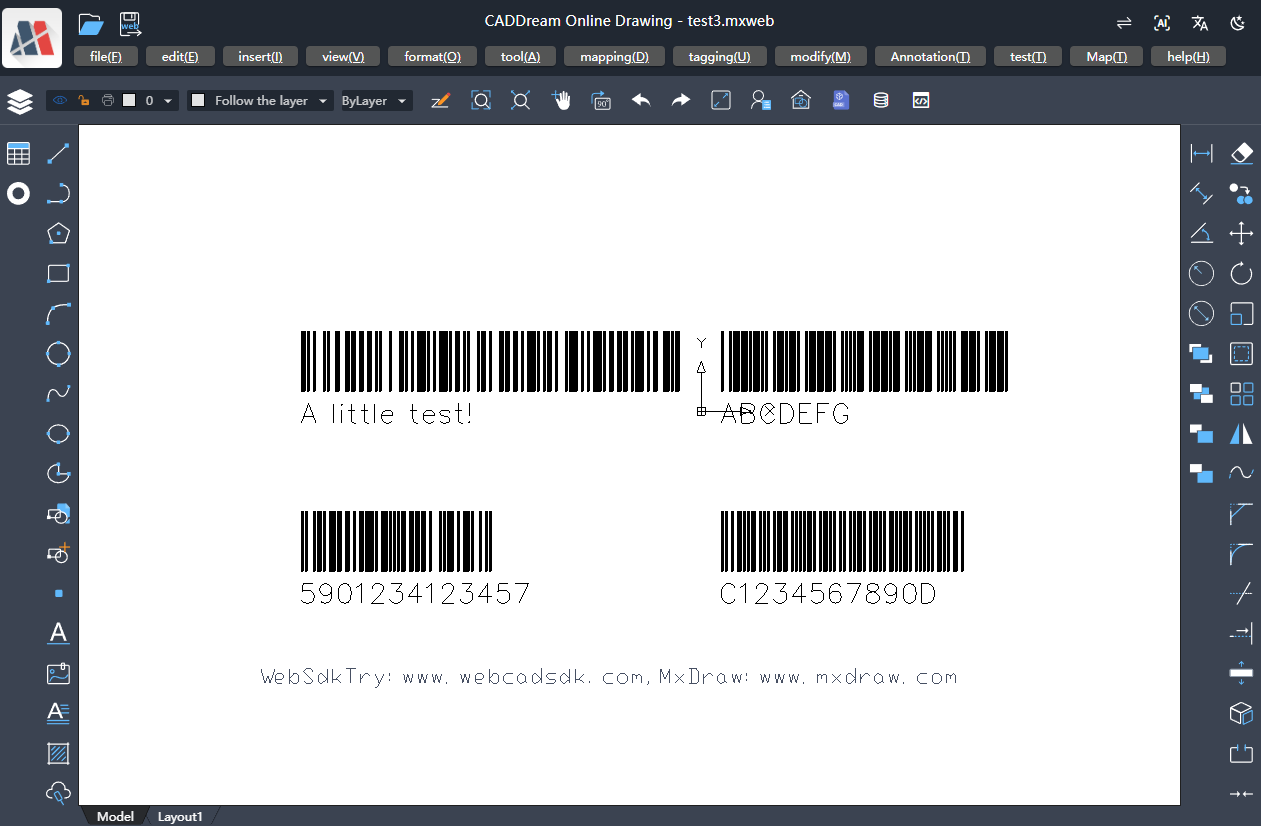
3) Call the barcode custom entity McDbTestBarCode to draw barcodes
async function Mx_drawBarCode() {
    const mxcad = MxCpp.getCurrentMxCAD();
    mxcad.newFile();
    mxcad.setViewBackgroundColor(255, 255, 255);
    // CODE39 type barcode
    const barCode = new McDbTestBarCode();
    barCode.barCodePos = new McGePoint3d(100, 100, 0);
    barCode.barCodeShowText = true;
    mxcad.drawEntity(barCode);

    // CODE128 type barcode
    const barCode2 = new McDbTestBarCode();
    barCode2.barCodeContent = 'A little test!';
    barCode2.barCodeType = 'CODE128';
    barCode2.barCodePos = new McGePoint3d(-2000, 100, 0);
    barCode2.barCodeShowText = true;
    mxcad.drawEntity(barCode2);

    // EAN13 type barcode
    const barCode3 = new McDbTestBarCode();
    barCode3.barCodeContent = '5901234123457';
    barCode3.barCodeType = 'EAN13';
    barCode3.barCodePos = new McGePoint3d(-2000, -800, 0);
    barCode3.barCodeShowText = true;
    mxcad.drawEntity(barCode3);

    // codabar type barcode
    const barCode4 = new McDbTestBarCode();
    barCode4.barCodeContent = 'C1234567890D';
    barCode4.barCodeType = 'codabar';
    barCode4.barCodePos = new McGePoint3d(100, -800, 0);
    barCode4.barCodeShowText = true;
    mxcad.drawEntity(barCode4);
    mxcad.zoomAll();
    mxcad.zoomScale(4);
}
Drawing Effect Demonstration:
QR Code Drawing
1. Principle
A QR code is a matrix two-dimensional barcode that can store information in both horizontal and vertical directions. The original data in a QR code can be numbers, letters, binary data, or other characters. According to the type of original data, select the appropriate encoding mode. For example, numeric data uses numeric mode, mixed letters and numbers use alphanumeric mode, and other types of data use byte mode.
The data after encoding the original data will be placed in a two-dimensional matrix. This process may require the use of masking technology. By applying specific mask patterns, the distribution of black and white dots in the QR code is optimized to avoid patterns similar to positioning markers. Among them, formatting and version information need to be added to specific areas of the matrix, and correction markers need to be added if necessary.
2. mxcad Implementation of QR Code Drawing
For the encoding rules of QR codes, we can directly use the open-source QR code JS library QRCode.js. For more details, please refer to: https://github.com/davidshimjs/qrcodejs.
Combined with QRCode.js, we can draw the black and white blocks in the two-dimensional matrix in mxcad through Hatch Entity McDbHatch. To facilitate subsequent management and expansion of QR codes, we can draw them as Custom Entity McDbCustomEntity and add custom attributes to them.
1) QRCode.js Extension
// Add makeMxcadCode method to QRCode class
QRCode.prototype.makeMxcadCode = function (sText) {
		this._oQRCode = new QRCodeModel(_getTypeNumber(sText, this._htOption.correctLevel), this._htOption.correctLevel);
		this._oQRCode.addData(sText);
		this._oQRCode.make();
		return this._oDrawing.drawMxcadHatch(this._oQRCode);
	};
// Draw mxcad hatch code (extend Drawing class)
Drawing.prototype.drawMxcadHatch = function (oQRCode): McDbEntity[] {
    const entityArr = [];
    var _htOption = this._htOption;

    var nCount = oQRCode.getModuleCount();
    var nWidth = _htOption.width / nCount;
    var nHeight = _htOption.height / nCount;

    for (var row = 0; row < nCount; row++) {
        for (var col = 0; col < nCount; col++) {
            var bIsDark = oQRCode.isDark(row, col);
            var nLeft = col * nWidth;
            var nTop = row * nHeight;
            if (bIsDark) {
                // Rectangle fill
                const pos = new McGePoint3d(nLeft, nTop, 0);
                const v_y = McGeVector3d.kYAxis.clone().negate().mult(nHeight);
                const v_x = McGeVector3d.kXAxis.clone().mult(nWidth);
                const pos1 = pos.clone().addvec(v_y);
                const pos2 = pos.clone().addvec(v_x);
                const pos3 = pos.clone().addvec(v_x).addvec(v_y);

                const solid = new McDbHatch();
                const ptArr = new McGePoint3dArray([pos, pos1, pos3, pos2]);
                solid.appendLoop(ptArr);
                entityArr.push(solid);
            }
        }
    }
    return entityArr;
};
2) Implementing Custom Entities
import { MxCpp, McDbCustomEntity, McGePoint3d, IMcDbDwgFiler, McGePoint3dArray, MxCADWorldDraw, McGeMatrix3d, McDbEntity } from  "mxcad";
import { QRCode } from './qrCode'

// Custom QR Code Entity
class McDbTestQrCode extends McDbCustomEntity {
    /** QR Code position */
    private position: McGePoint3d = new McGePoint3d();
    // QR Code height
    private codeHeight: number = 300;
    // QR Code width
    private codeWidth: number = 10;
    // QR Code content setting
    private codeContent: string = 'https://demo.mxdraw3d.com:3000/mxcad/';

    constructor(imp?: any) {
        super(imp);
    }
    public create(imp: any) {
        return new McDbTestQrCode(imp)
    }
    /** Get class name */
    public getTypeName(): string  {
        return  "McDbTestQrCode ";
    }
    // Set or get base point
    public set qrCodePos(val: McGePoint3d) {
        this.position = val.clone();
    }
    public get qrCodePos(): McGePoint3d {
        return this.position;
    }
    // Set or get code height
    public set qrCodeHeight(val: number) {
        this.codeHeight = val;
    }
    public get qarCodeHeight(): number {
        return this.codeHeight;
     }
    // Set or get code width
    public set qrCodeWidth(val: number) {
        this.codeWidth = val;
    }
    public get qrCodeWidth(): number {
        return this.codeWidth;
    }
    // Set or get QR code content
    public set qrCodeContent(val: string) {
        this.codeContent = val;
    }
    public get qrCodeContent(): string {
        return this.codeContent;
    }
    /** Read data */
    public dwgInFields(filter: IMcDbDwgFiler): boolean {
        this.position = filter.readPoint("position").val;
        this.codeWidth = filter.readDouble("codeWidth").val;
        this.codeHeight = filter.readDouble("codeHeight").val;
        this.codeContent = filter.readString("codeContent").val;
        return true;
    }
    /** Write data */
    public dwgOutFields(filter: IMcDbDwgFiler): boolean {
        filter.writePoint("position", this.position);
        filter.writeDouble("codeWidth", this.codeWidth);
        filter.writeDouble("codeHeight", this.codeHeight);
        filter.writeString("codeContent", this.codeContent);
        return true;
    }
    /** Move grip points */
    public moveGripPointsAt(iIndex: number, dXOffset: number, dYOffset: number, dZOffset: number) {
        this.assertWrite();
        if (iIndex === 0) {
            this.position.x += dXOffset;
            this.position.y += dYOffset;
            this.position.z += dZOffset;
        }
    };
    /** Get grip points */
    public getGripPoints(): McGePoint3dArray {
        let ret = new McGePoint3dArray();
        ret.append(this.position);
        return ret;
    };
    /** Dynamic drawing */
    public worldDraw(draw: MxCADWorldDraw): void {
        const qrcode = new QRCode('', {
            width: this.codeWidth,
            height: this.codeHeight
        });
         const objArr = qrcode.makeMxcadCode(this.codeContent);
        objArr.forEach((obj: McDbEntity) => {
            const entity = obj.clone() as McDbEntity;
            entity.move(new McGePoint3d(0, 0, 0), this.position);
            draw.drawEntity(entity);
        })

    };
    // Edit transformation
    public transformBy(_mat: McGeMatrix3d): boolean {
        this.position.transformBy(_mat);
        return true;
    }
}
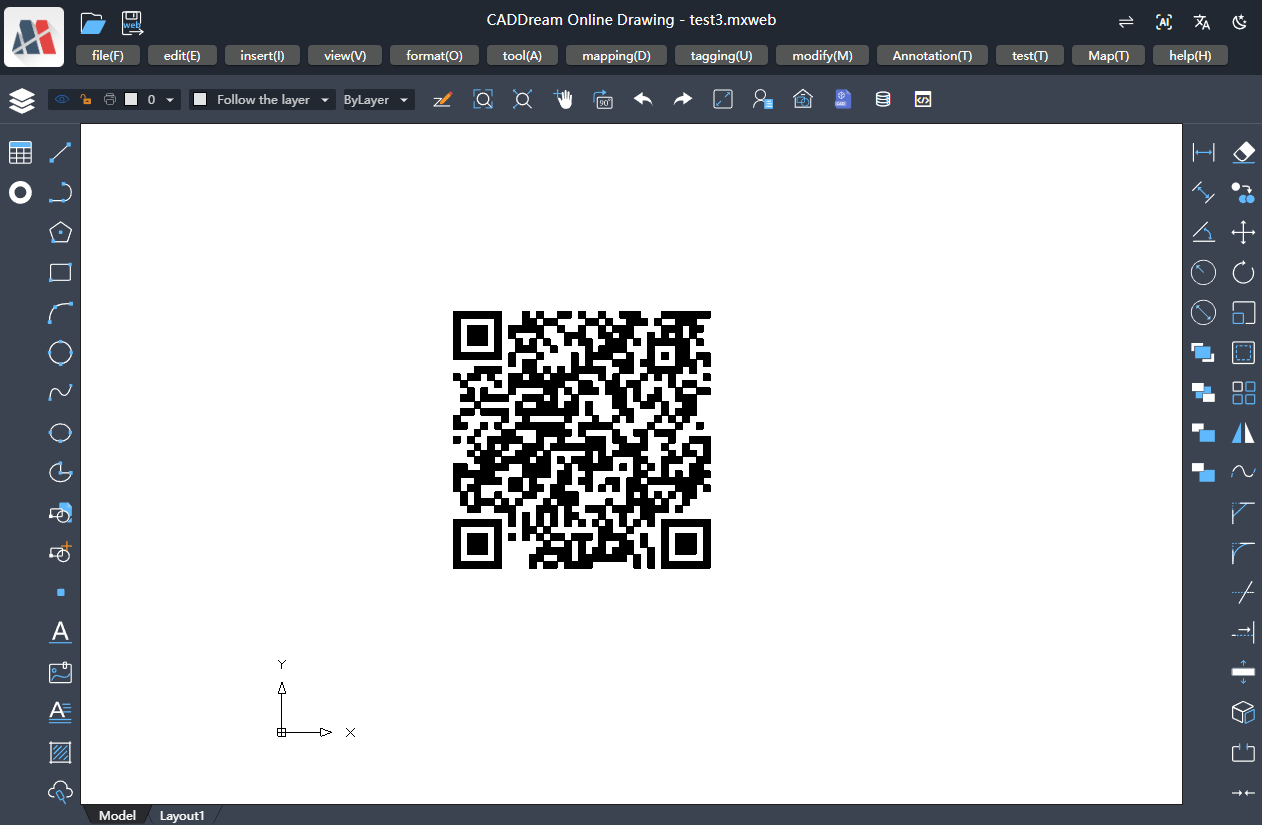
Call the QR code custom entity McDbTestQrCode to draw QR codes
// Draw QR code
async function Mx_drawQrCode() {
    const mxcad = MxCpp.getCurrentMxCAD();
    mxcad.newFile();
    const qrcode = new McDbTestQrCode();
    qrcode.qrCodePos = new McGePoint3d(1000, 1000, 0);
    qrcode.qrCodeContent = 'https://demo.mxdraw3d.com:3000/mxcad/';
    qrcode.qrCodeWidth = 1500;
    qrcode.qrCodeHeight = 1500;
    mxcad.drawEntity(qrcode);
    mxcad.zoomAll();
};
Drawing Effect Demonstration: